How to Cut Your Digital Carbon Footprint with Simple Everyday Changes
For busy professionals and families who live on email, streaming, and cloud storage, the digital carbon footprint can feel invisible, and that’s the challenge. The environmental impact of technology doesn’t show up as smoke, yet everyday screen time and always-on data habits still translate into real energy use. Many general readers want to start reducing personal emissions without giving up the convenience that keeps work, school, and life moving. A few mindful digital habits can make that impact smaller starting today.
Where Your Digital Carbon Footprint Comes From
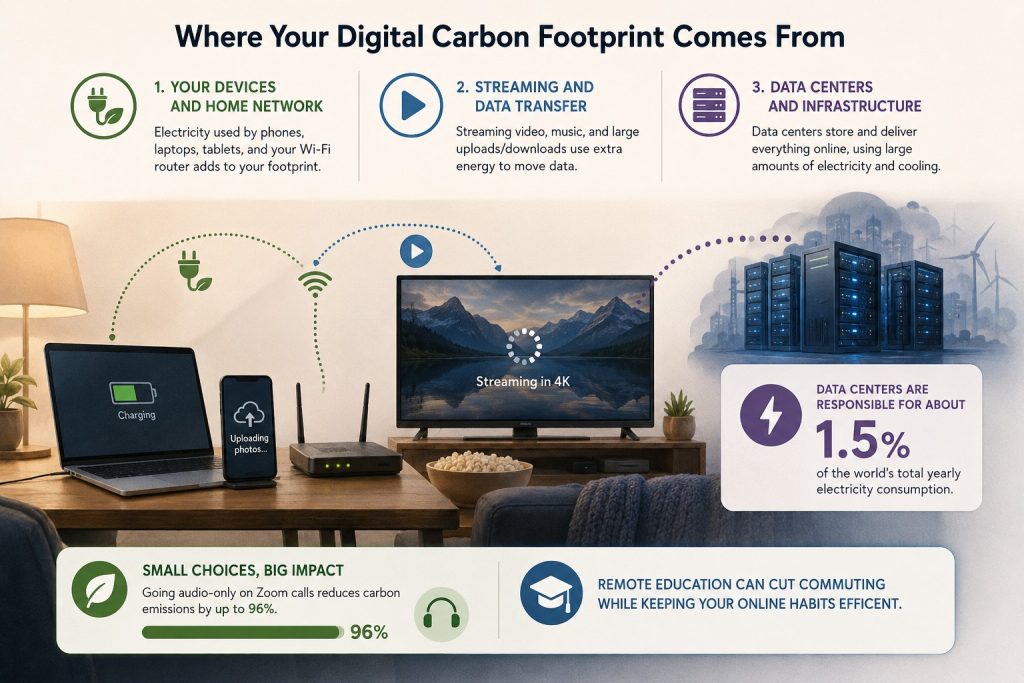
To make screen habits greener, it helps to know what uses energy. Your digital footprint mainly comes from three places: the electricity your phone, laptop, and router draw, the extra power needed to deliver streaming video and music, and the emissions tied to the data centers that store and move everything online.
This matters because internet activity is not weightless. Behind every “just one more episode” are servers and cooling systems running around the clock, and data centres are responsible for about 1.5% of the world’s total yearly electricity consumption. When you understand the sources, you can target the biggest wins without giving up convenience.
Picture a typical evening: a laptop charging, a TV streaming in 4K, and photos auto-uploading to the cloud. Each step adds demand, so small choices stack fast, and going audio-only on Zoom calls reduces carbon emissions by up to 96% shows how format alone can change impact. With that map in mind, remote education can cut commuting while keeping your online habits efficient.
Replace Commutes With Online Learning—and Shrink Emissions
Once you see how much energy sits behind everyday digital activity, it’s easier to spot big “routine swaps” that cut emissions fast. Earning an online degree is a practical example: by learning from home, you can eliminate the repeated transportation emissions of commuting and reduce the campus-related energy use tied to in-person classes (like lighting, heating/cooling, and building operations), while still moving your education forward through digital coursework. If you’re interested in both career growth and building more responsible tech habits, an online degree in cyber security can also teach best practices in systems and services, networking and security, scripting and programming, data management, and the business of IT.
Cut Your Digital Footprint in 5 Simple Steps
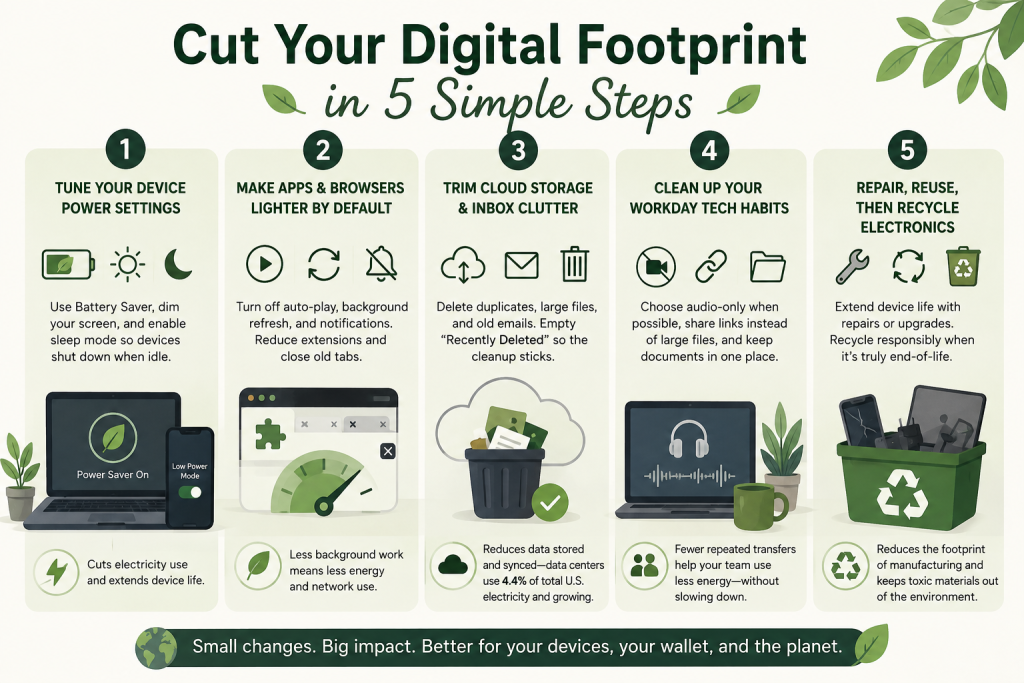
This quick process helps you reduce the hidden energy behind your screens, storage, and devices without changing your whole life. It matters because small, repeatable settings and habits can shrink both your power use at home and the upstream demand created by always-on digital services.
- Tune your device power settings
Start with the biggest “always running” drain: screens and idle time. Turn on Battery Saver or Low Power Mode, set your display to dim sooner, and enable sleep mode for your computer and monitor so they shut down when you step away. These changes cut electricity use immediately and also reduce heat, which can extend device life. - Make apps and browsers lighter by default
Review auto-play, background refresh, and notifications in your phone settings, then turn off what you do not need so apps are not constantly updating in the background. In your browser, reduce unnecessary extensions and close old tabs, since each one can keep activity running and encourage extra data loading. Less background work means less energy spent on processing and on network activity. - Trim cloud storage and inbox clutter
Pick one place to start, such as photos, downloads, or email, and delete duplicates, giant attachments, and old files you will never use. Set a monthly reminder to empty “Recently Deleted” and trash folders so the cleanup actually sticks. This reduces the amount of data you store and sync, which helps because data centers are already responsible for 4.4% of total U.S. electricity and growing. - Clean up your workday tech habits
Choose one meeting per day to go audio-only when video is not necessary, and share links instead of emailing large files back and forth. Store team documents in one shared location with clear naming so people stop saving multiple versions and re-uploading the same content. Small workflow tweaks reduce repeated transfers and help your whole workplace use less energy without slowing down. - Repair, reuse, then recycle electronics responsibly
Before replacing a device, check whether a new battery, storage cleanup, or simple repair can keep it working longer, since manufacturing a replacement carries a big footprint. When something truly reaches end-of-life, use a trusted drop-off program because the e-waste recycling process focuses on recovering materials from discarded electronics and keeping harmful substances out of the environment.
Digital Carbon Footprint Questions, Answered
Q: What actually “counts” in my digital carbon footprint?
A: It includes the electricity your device uses plus the energy behind storing and moving data online. The idea that energy is used at the data center, during transmission, and on your device explains why streaming, syncing, and constant background activity all add up. A simple next step is to cut one high-volume habit, like auto-play or endless cloud backups.
Q: Do energy-efficient devices really help, or is it too small to matter?
A: They help most when paired with good settings. A newer, efficient device running at full brightness all day still wastes power, so start by dialing down screen timeouts and sleep settings. Keep devices longer when possible since replacement has its own footprint.
Q: Should I delete old emails and files, or is that pointless?
A: Deleting clutter can reduce what you store and sync, especially large attachments and duplicate photos. Focus on the biggest files first, then empty trash folders so the cleanup sticks. Set a 10-minute monthly reminder to maintain it.
Q: How can I reduce impact if I need video calls for work or school?
A: You do not have to quit the video entirely. Use video only when it adds value, switch to audio for routine check-ins, and share a single link to a file instead of sending new copies. Lowering video quality can also cut data use while keeping meetings effective.
Q: What if my family will not change their habits with me?
A: Pick changes that feel invisible, like stronger sleep settings, fewer auto-downloads, and turning off unnecessary background permissions. Frame it as faster devices and fewer distractions, not a sacrifice. One shared household rule, like no auto-play, is often the easiest win.
Build a Smaller Digital Carbon Footprint With Three Consistent Habits
Always-on streaming, endless cloud storage, and constant device upgrades make it easy to rack up emissions without noticing. The way forward is a simple mindset: treat digital choices like any other resource, using a quick digital habit audit to spot waste and replace it with steady, repeatable routines for reducing digital emissions. When you follow through, your tech life gets lighter, fewer unnecessary transfers, fewer idle services, and clearer personal carbon footprint goals that support long-term sustainable tech use. Small digital choices, repeated daily, are the most reliable way to cut your footprint. Set a timer for 10 minutes, run your digital habit audit, and choose three environmental commitment steps to stick with this week. Those small wins build resilience and keep your digital life efficient without sacrificing what you enjoy.
Article by Bret Engle